

Moderation Log
Sends messages to a text channel using a Discord webhook URL to log temporary channel actions like creation, deletion and modification.
Temporary channels come and go, so it's hard to see what happened in them afterwards. The Moderation Log posts a message to a text channel of your choice every time something happens in a temporary channel of this Creator Channel. Your moderators can then see who created a channel, who renamed it to something inappropriate or who kicked whom.
The log includes:
- Created and deleted temporary channels, including force deletes.
- Created and deleted temporary chats and waiting rooms.
- Changes to the name, user limit, region and bitrate.
- Claims and ownership transfers.
- Locking, unlocking, hiding and unhiding channels.
- Trusted, untrusted, blocked, unblocked, invited, kicked and vote kicked users.
TempVoice posts the messages through a webhook: a link that lets an app post messages into one specific text channel. Paste the webhook URL of your log channel in the Dashboard to start logging.
For security reasons, the saved webhook URL is never shown again. Paste a new URL to replace it, or delete the webhook to stop logging.
How to get a Discord Webhook URL?
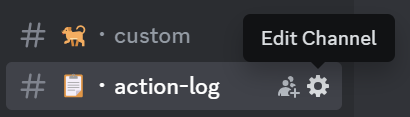
Click on the edit icon of the text channel you want to use as the log.
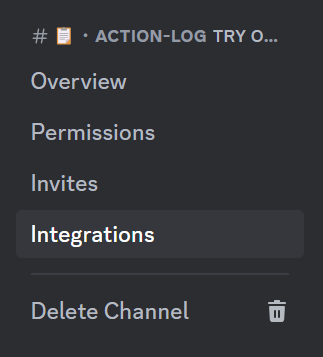
Go to Integrations.
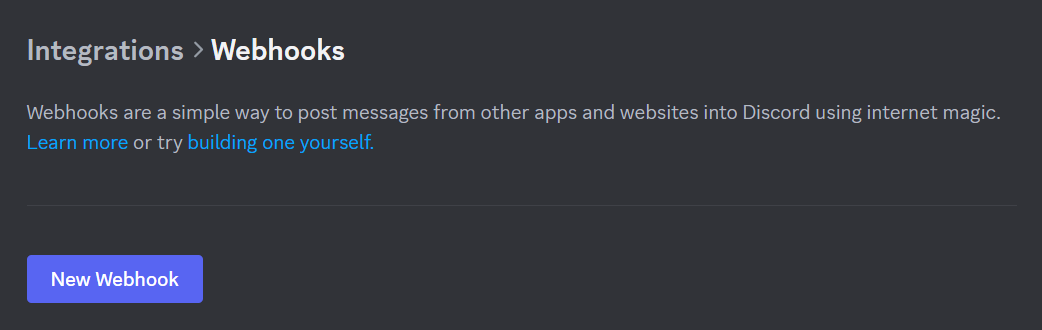
Click on Webhooks.

Click on New Webhook.
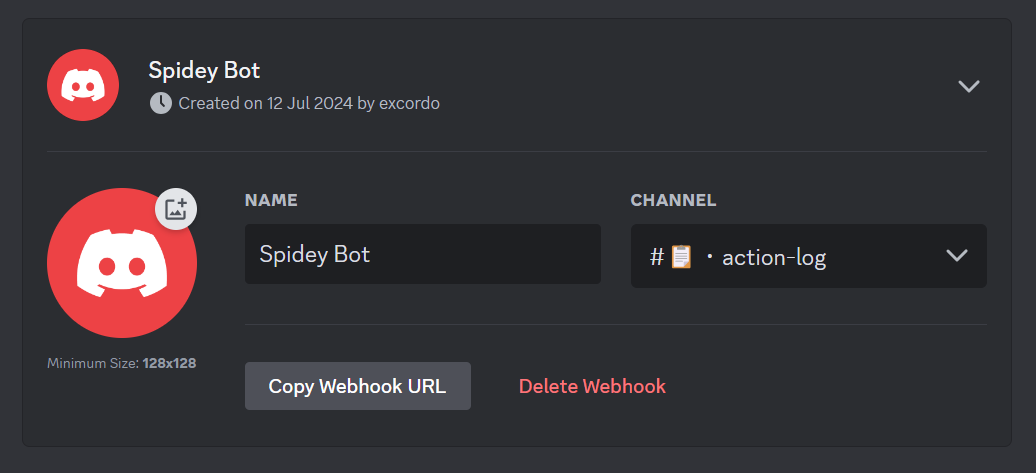
Open the new webhook below the New Webhook button and click on Copy Webhook URL.
Treat the webhook URL like a password and don't share it with anyone. Anyone with the URL can post messages to your channel.